
Product search index
Geeky Bot searches its own index of your WooCommerce products rather than querying the catalog for every question. The index makes search fast and lets Geeky Bot match shopper wording, typos and synonyms against your products.
What the index holds
Section titled “What the index holds”For each product that shoppers can see, the index stores:
- the title and SKU,
- categories and tags,
- attributes, including colours and sizes,
- the short and full description,
- price, sale status and stock,
- any Smart Catalog words, if you use the Smart Catalog search level.
Each site has its own index. On a multilingual site using WPML or Polylang, each translation of a product is indexed as its own product.
Build the index for the first time
Section titled “Build the index for the first time”Geeky Bot builds the index by itself: shortly after you activate the plugin, and when WooCommerce is activated. You can check or start it yourself.
- Open Geeky Bot → Product Search.
- Look at Products indexed and Index status at the top of the screen.
- If no products are indexed, scroll to Tune the index and select Rebuild search index in the Product index card.
The Setup screen’s Product search index step turns Ready once at least one product is indexed.
Automatic sync
Section titled “Automatic sync”You don’t need to rebuild after ordinary edits. The index updates itself when you:
- add, edit, publish, unpublish, trash or restore a product,
- change stock on a product or a variation,
- add, edit or delete a variation,
- change a product’s categories, tags or other terms.
When you rename or delete a product category or tag, Geeky Bot schedules a full rebuild in the background, because many products may be affected.
Rebuild the index
Section titled “Rebuild the index”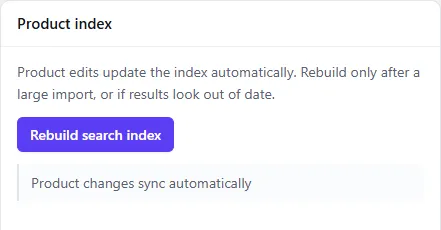
Rebuild after a large import, or if results look out of date.
- Open Geeky Bot → Product Search.
- Scroll to Tune the index.
- Select Rebuild search index.
Shoppers keep searching the current index while the new one is built, and the new index replaces it when it is complete. A small catalog finishes before the page reloads, and you see “Product search index rebuilt” with the number of products indexed and skipped. A larger catalog continues in the background, and you see how many products have been processed so far. If a rebuild is interrupted, it resumes instead of starting over.
Index status shows one of these:
| Status | What it means |
|---|---|
| Up to date | The index is current. Product changes sync automatically. |
| Rebuilding | A rebuild is running, with the percentage done. |
| Scheduled | A full rebuild is scheduled to run shortly. |
| Pending | A full rebuild is needed and waiting to start. |
| Waiting | A rebuild is needed, but WooCommerce isn’t active. |
What is never shown
Section titled “What is never shown”Geeky Bot only indexes and shows products shoppers can already see in your store. A product is left out when:
- it isn’t published (drafts, pending, private and trashed products),
- it is password-protected,
- its WooCommerce Catalog visibility is Shop only or Hidden. Products set to Shop and search results or Search results only are included.
Variations are never shown as products of their own. Geeky Bot reads a variation’s details, such as price and stock, through its parent product.
When WooCommerce Coming soon mode hides your store, the chat is hidden too, for the same visitors. Administrators, shop managers and visitors with the private preview link still see it.