
Order help
With Commerce Pro, customers who are signed in to your store can ask the chat about their own orders: “where is my parcel”, “my last order” or “show my orders”. This answers the most common support question without anyone on your team.
The free Geeky Bot can’t read orders. It tells shoppers it can’t look orders up and links to their account page.
Switch order help on
Section titled “Switch order help on”- Open Geeky Bot → Commerce Pro.
- Select the Buying actions tab.
- Turn on Order lookup.
- Select Save settings.
It’s on when you first install Commerce Pro. While it’s off, the chat doesn’t open order lists or answer order questions such as “where is my parcel”. Before Commerce Pro 2.1.3, typed order questions were still answered with the switch off.
Who can see orders
Section titled “Who can see orders”Order help works only for customers who are signed in, and only for orders placed on their own account.
- The signed-in WordPress user is the only identity the chat accepts. Nothing a shopper types, such as an email address or someone else’s order number, can unlock an order.
- An order number in a message only picks out one of the customer’s own orders. It is never used to look up an order on its own. If the number isn’t on their account, the chat says “I couldn’t find order [number] on your account.”
- Orders placed as a guest, without an account, can’t be reached from the chat.
What guests see
Section titled “What guests see”A shopper who isn’t signed in and asks about an order is sent to their account page:
- A typed order request such as “my orders” gets “Please log in to view your order status.” with a Log in to account button. After signing in, the shopper lands on the My account page.
- Other order questions get the same answer as the free plugin: the chat can’t look up orders, with a link to the account page.
What customers see
Section titled “What customers see”Quick answers
Section titled “Quick answers”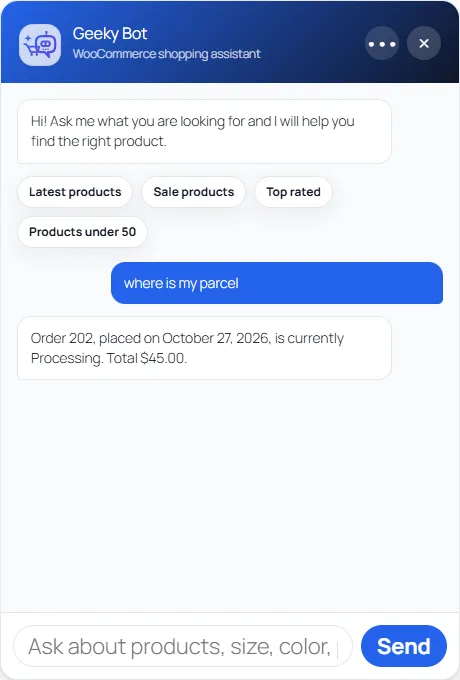
Questions such as “where is my parcel”, “has my order shipped” or “what did I buy last time” get a one-line answer from the customer’s most recent order, for example “Order 1042, placed on 3 October 2026, is currently Processing. Total $64.00.” A question about past purchases lists what was in the last order and its status.
The chat answers from the customer’s five most recent orders.
Order list and details
Section titled “Order list and details”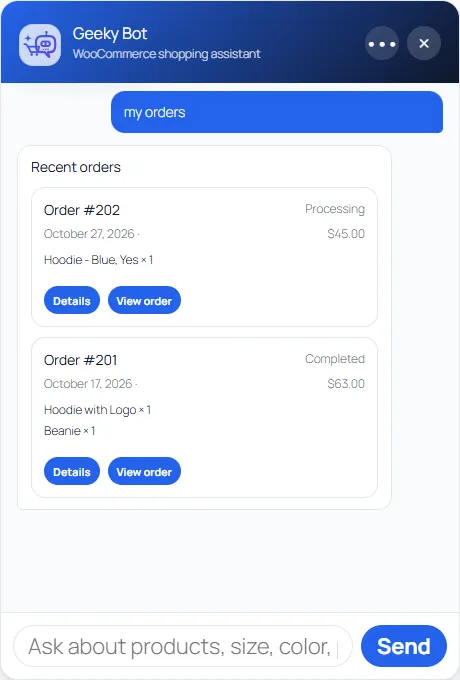
Typing “my orders”, “order history” or “order status” shows the customer’s five most recent orders. Each card shows the order number, status, date, total and up to three items, with a Details button and a View order link.
Details shows the order’s Status, Date, Total, Payment and Shipping methods and its items. It has a View order link to the order in My account, and a Pay order link when the order still needs paying.
The status is the WooCommerce order status, such as Processing or Completed. Commerce Pro doesn’t connect to shipping carriers, so there is no live tracking in the chat.
Things to know
Section titled “Things to know”- Order questions are recognised in English only.
- Each order list or details card opened counts toward Order lookups on the Commerce Pro screen. See Sales insights.