
Store Knowledge
Store Knowledge is the short list of published pages Geeky Bot may use to answer store-policy questions, such as “How long does shipping take?” or “Can I return a sale item?”. Only the pages you tick are used, and when they don’t hold the answer the assistant says so instead of guessing.
Choose your pages
Section titled “Choose your pages”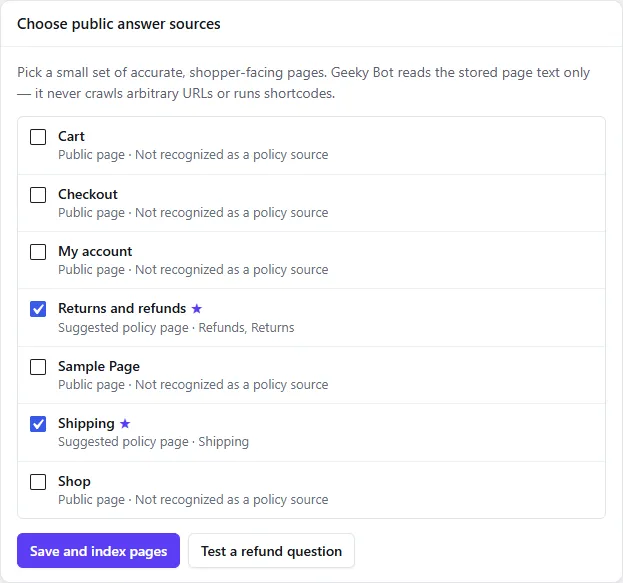
- Open Geeky Bot → Store Knowledge.
- Under Choose public answer sources, tick each page shoppers should get answers from. Pages whose titles look like policies are marked Suggested policy page.
- Select Save and index pages.
- Select Test a refund question to check an answer.
You can choose up to 25 published pages. Under each page, Geeky Bot shows the topics it recognised in it. Pick a small set of accurate, shopper-facing pages.
The top of the screen shows Selected sources, Recognized sources and whether Knowledge is current. If a ticked page has no recognised topic, a warning lists it: such a page won’t answer specific policy questions.
Topics answered from your pages
Section titled “Topics answered from your pages”| Topic | Questions that reach it |
|---|---|
| Shipping and delivery | shipping, delivery, dispatch, postage, courier, tracking, “ship internationally” |
| Returns | return, returning, send back |
| Refunds | refund, money back, reimbursement |
| Exchanges | exchange, swap item, change item |
| Warranty | warranty, guarantee, when asked about the store, such as “What warranty do you offer?” |
| Cancellation | cancel, cancel my order, cancellation |
| Payment | payment method, pay with, PayPal, Apple Pay, Google Pay, cash on delivery, credit or debit card, bank transfer |
| Privacy | privacy, personal data, data protection |
| Terms | terms, terms and conditions, terms of service |
| Store information | about us, contact us, customer service, store address, opening hours, “who runs this store” |
Some questions describe a situation instead of naming a policy. “What if my item arrives damaged?” goes to your returns page, and a delayed order to your shipping page.
These questions are recognised from English wording. A question about one product’s warranty is answered from that product’s details instead, and a question about the state of one order (“Where is my order?”) is not a policy question.
Policy questions are checked before product search, and they are answered from your pages in every answer mode, including Zywrap and OpenAI.
Each topic uses its own pages
Section titled “Each topic uses its own pages”Geeky Bot sorts each page by topic, mainly from its title, and also from clear policy phrases in its text such as “return policy” or “we ship to”. A question is answered only from pages of its own topic. A shipping page is never used to answer a refund question, even if it mentions refunds in passing.
An FAQ page can be ticked like any other page. It answers the topics above when its title or text uses clear policy wording. There is no separate question-and-answer editor, and questions outside these topics aren’t answered from your pages.
What shoppers see
Section titled “What shoppers see”A grounded answer quotes the page, for example: According to the store’s “Shipping” page: Orders are dispatched within two business days. Below it, Source: links to the page.
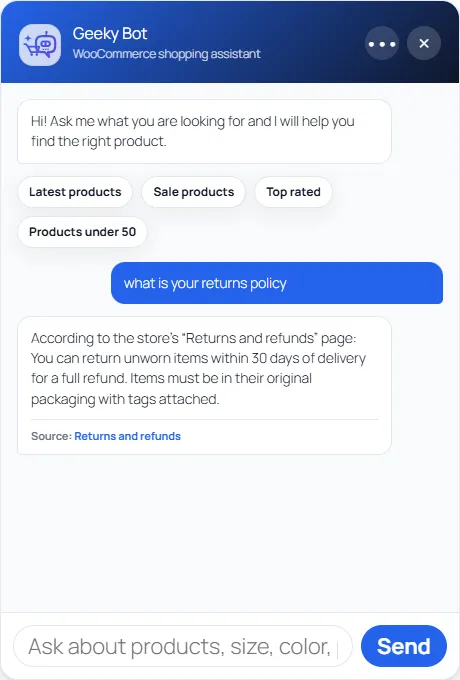
If no ticked page covers the topic, or the page doesn’t hold the detail, the shopper is told the information isn’t in the store’s published pages and is asked to contact the store. These questions appear under Needs review on Conversations, so you can see which pages to add or improve.
Keep pages up to date
Section titled “Keep pages up to date”- Editing and updating a ticked page re-indexes it automatically.
- Unpublishing, trashing or deleting a ticked page removes it from the index.
- After imports, page-builder migrations, or when a source shows as stale or missing, select Refresh selected sources. A notice reports how many pages were indexed, unchanged, removed or failed.
What Geeky Bot reads
Section titled “What Geeky Bot reads”Geeky Bot reads only the saved text of the pages you tick, up to the first 60,000 characters of each. It does not crawl other pages or URLs, and it does not run shortcodes, so text that a shortcode would produce isn’t seen. Indexing happens on your server and sends nothing to outside services.