
Zywrap
Zywrap is a hosted AI service that Geeky Bot can use to write chat answers. You don’t need an OpenAI account: you pay Zywrap in credits, and new accounts start with free credits. A saved Zywrap key can also run the Smart Catalog, Rescue and learning search levels.
Create or connect an account
Section titled “Create or connect an account”You can create a free account, or sign in to an existing one, without leaving WordPress.
-
Open Geeky Bot → AI & Privacy.
-
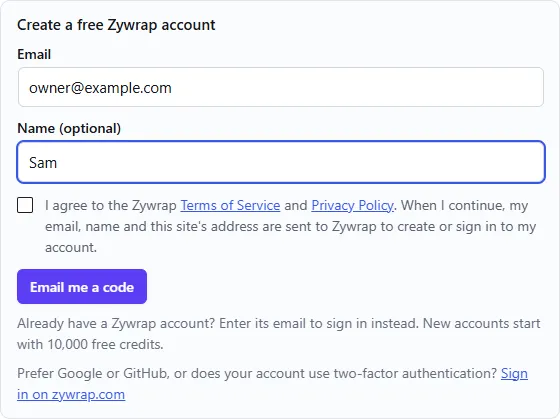
Under AI connection, select Zywrap endpoint. The Create a free Zywrap account box appears.
-
Check the address in Email. It starts with your own WordPress email. To connect an existing Zywrap account, enter that account’s email.
-
Optionally, fill in Name (optional).
-
Tick the box to agree to the Zywrap Terms of Service and Privacy Policy.
-
Select Email me a code.
-
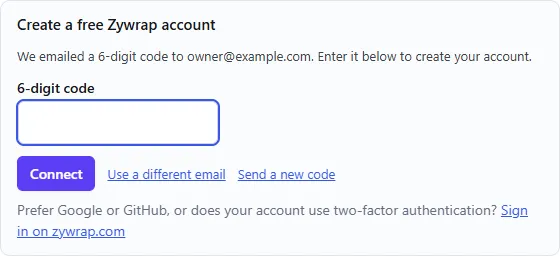
Enter the code from Zywrap’s email in 6-digit code.
-
Select Connect.
The key is saved on your site, the answer mode switches to Zywrap, and the endpoint is filled in. You see “Connected. Zywrap now writes the chat answers.” You don’t need to select Save settings.
If the email doesn’t arrive, select Send a new code, or Use a different email to start again. A code expires after 10 minutes.
Sign in on zywrap.com
Section titled “Sign in on zywrap.com”Accounts that use Google, GitHub or two-factor authentication can’t use an emailed code.
- Below the form, select Sign in on zywrap.com.
- Sign in on zywrap.com and approve your site.
- zywrap.com sends you back to AI & Privacy with the key saved.
Use a key you already have
Section titled “Use a key you already have”- On zywrap.com, open Dashboard → API Keys and copy a key.
- Open Geeky Bot → AI & Privacy and select Zywrap endpoint.
- Paste the key into Zywrap API key.
- Select Save settings.
The key is stored encrypted and never shown again. The status changes to Endpoint and key saved.
When you’re connected
Section titled “When you’re connected”For an account connected from the box, AI & Privacy shows “Connected to Zywrap as” your email, and the credits the account had when it connected.
- See balance and top up opens your Zywrap dashboard.
- Disconnect removes the key from this site. If Zywrap was writing answers, the answer mode goes back to local. The key still works on zywrap.com until you delete it there.
The endpoint
Section titled “The endpoint”The Zywrap endpoint field is filled in with https://api.zywrap.com/v1/proxy. Leave it as it is.
Credits and costs
Section titled “Credits and costs”These figures come from Zywrap and may change. Check zywrap.com for current prices.
- New accounts start with 10,000 free credits.
- One credit costs $0.00001, so 100,000 credits cost $1.
- A chat answer uses about 100 credits, roughly $0.001. The free credits cover about 100 chat answers.
- Zywrap limits free and pay-as-you-go accounts to 60 requests a minute.
Local replies and cached answers use no credits.
What is sent to Zywrap
Section titled “What is sent to Zywrap”- Chat answers. In Zywrap mode, Geeky Bot sends the shopper’s question, a grounding instruction, relevant visible-product context and relevant approved policy-page context to Zywrap, which writes the answer. The address is
https://api.zywrap.com/v1/proxyunless you enter another under AI & Privacy. - Where it goes. Zywrap runs in the United States. It passes each request to the AI model provider it uses for these answers, currently OpenAI (gpt-6-luna), which writes the reply. Zywrap’s privacy policy describes what is stored and for how long.
- Search levels. With a Zywrap key saved, Smart Catalog, Rescue and learning from missed searches use Zywrap when Zywrap is the answer mode, or when no OpenAI key is saved. They send the same information listed on the OpenAI page, and the same daily and monthly AI call limit applies.
- Local mode. No shopper question is sent to Zywrap for an answer. Only Rescue and learning, when switched on, send the wording of searches that found nothing.
- Creating or connecting an account. Nothing is sent until you tick the consent box and select Email me a code or Sign in on zywrap.com. Geeky Bot then sends Zywrap the email and optional name you entered, your site’s address and name, a name for the key (“Geeky Bot – “ and your domain), and where the sign-up came from: Geeky Bot, its version, and UTM tags (
utm_source=geeky-bot,utm_medium=wordpress-plugin, a campaign name and the Geeky Bot screen it started on). Sign in on zywrap.com opens zywrap.com with the same details in the address. Links from Geeky Bot to zywrap.com carry the same UTM tags.
Error messages
Section titled “Error messages”| Message | What to do |
|---|---|
| Please enter a valid email address. | Correct the email and try again. |
| Please tick the box to agree to the Zywrap Terms of Service and Privacy Policy. | Tick the consent box. |
| Please enter the 6-digit code from the email. | Enter all six digits. |
| That code is not right. Check the email and try again. | Copy the code again from the latest email. |
| That code expired or was already used. Ask for a new one. | Select Send a new code. |
| This account uses two-factor authentication. Use “Sign in on zywrap.com” below. | Use Sign in on zywrap.com. |
| That sign-in expired or was already used. Please start again. | Select Sign in on zywrap.com again and finish within 10 minutes. |
| Signing in on zywrap.com was cancelled. Nothing was changed. | Start again when you’re ready. |
| Too many attempts. Please wait a few minutes and try again. | Wait, then try again. |
| This site could not reach Zywrap. Check that it can make outgoing HTTPS requests, then try again. | Ask your host whether outgoing HTTPS requests are blocked. |
| The Zywrap key could not be saved: this server cannot store keys encrypted. Ask your host to enable OpenSSL or Sodium for PHP. | Ask your host to enable one of these PHP extensions. |
| Connecting to Zywrap did not complete. Please try again. | Try again. If it keeps failing, see Troubleshooting. |
If Zywrap can’t answer a chat question, for example because the credits ran out, the key is wrong or Zywrap is down, the shopper gets the local reply and no error. If chat replies look local while Zywrap is selected, check your balance with See balance and top up. On Product Search, Smart Catalog shows Paused after an error with Zywrap’s message, such as “Insufficient credits”, and retries by itself every 15 minutes.