
Introduction
Geeky Bot is a shopping assistant for WooCommerce stores. It adds a chat to your storefront that helps shoppers find products, answers questions about them, and answers store-policy questions from pages you approve.
What Geeky Bot is, and what it isn’t
Section titled “What Geeky Bot is, and what it isn’t”Geeky Bot is built for one job: helping shoppers in a WooCommerce store find and choose products. It isn’t a general-purpose website chatbot.
- It answers from your WooCommerce catalog: titles, descriptions, attributes, variations, prices and stock.
- It answers policy questions (shipping, returns, refunds, payment, warranty and similar) only from published pages you select under Geeky Bot → Store Knowledge. It doesn’t crawl other pages or URLs.
- It only shows products that shoppers can already see in your store. Hidden, draft and password-protected products never appear.
- When your product data or approved pages don’t contain the answer, it says so instead of guessing.
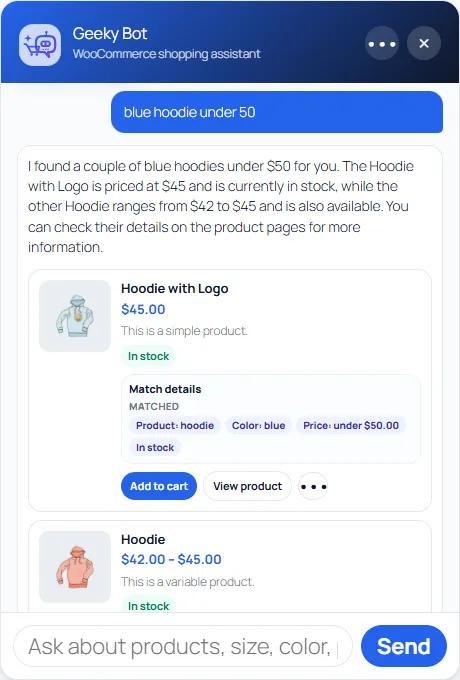
A shopper can ask “Show me wireless headphones under $100 that are in stock”, follow up with “Which would you recommend for daily commuting?”, and then ask about the recommended product. Geeky Bot keeps track of the conversation between questions.
What the free plugin does
Section titled “What the free plugin does”The free plugin from WordPress.org includes:
- Product search in plain language: by name, category, price, colour, size, stock and sale status, with typo tolerance and synonyms.
- Answers to product questions, and recommendations that explain why a product matches.
- Store policy answers from the pages you approve.
- The storefront widget, with product cards, suggested questions and a timed shopper invitation.
- A setup screen, a Guided Demo built from your own products, and a phrase test lab for product search.
- Conversation review, unanswered-question review, analytics, CSV export, retention settings and WordPress personal-data export and erasure.
- Translations of the plugin, installed automatically for your site’s language.
What Commerce Pro adds
Section titled “What Commerce Pro adds”Commerce Pro is a paid add-on that lets shoppers act on what they find, inside the chat:
- Add simple, variable and subscription products to the cart, including choosing options such as size and colour.
- View the cart, change quantities, remove items, and go to checkout.
- Order help for logged-in customers, limited to their own orders.
- Side-by-side product comparison, related and upsell suggestions, and coupon codes you approve.
- A contact form when a shopper asks for a person, sales rules and extra guardrails, and buying-action analytics.
- The Rescue search level and learning from missed searches.
See Free and Commerce Pro for the full comparison.
Local mode and optional AI
Section titled “Local mode and optional AI”Geeky Bot starts in Local grounded mode. In this mode it calls no language model: answers are put together from your catalog and your approved policy pages, and nothing is sent to an AI service. You don’t need an AI account or API key.
If you want answers written in conversational wording, you can connect an AI service under Geeky Bot → AI & Privacy:
- OpenAI, with your own OpenAI API key.
- Zywrap, with a Zywrap key. You can create a free Zywrap account, or connect an existing one, from the same screen.
When an AI service is connected, Geeky Bot sends it the shopper’s question, a grounding instruction, summaries of relevant visible products and excerpts from approved policy pages. A site-wide daily and monthly limit on AI calls applies. Past the limit, shoppers still get local answers.
AI is also used, only if you turn them on, by the Smart Catalog and Rescue search levels under Geeky Bot → Product Search.
Where to go next
Section titled “Where to go next”- Check the requirements.
- Install Geeky Bot and work through the Setup screen.
- Build the product search index.
- Test before publishing.